Export a semantic artefact from VocBench
To facilitate the publication of semantic artefacts in EcoPortal, a direct deployer from VocBench has been constructed. Users have to access the “Global Data Management” menu and click on “Export data”.
The “Export data” panel consists of three sections as shown in Figure 41:
- Graphs to export: this section allows the selection of the graph to export. The default selection just contains the graph of the selected project, named with the base URI, which contains the data being edited.
- Data transformations: this section allows the configuration of a sequence of RDF Transformers, which can be used to manipulate the data being exported (e.g. selecting a specific ConceptScheme, add triples, replace triples, etc.)
- Deployment: this section allows the configuration of the data destination. Users can choose from a dropdown menu whether the data will be saved to file, exported to a triple store, or sent to a custom destination. The target of the EcoPortal Deployer is considered a triple store.
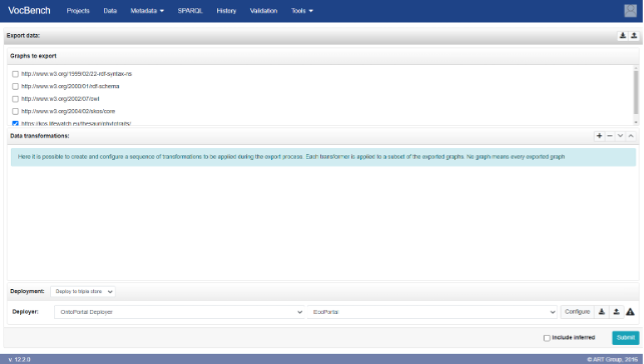
Figure 41: Global Data Management export
After selecting “Deploy to a triple store” in the Deployment dropdown, the Deployer dropdown list will appear. Here users have to select “OntoPortal Deployer” and the item labelled EcoPortal to enable the specific characteristics of the deployer (e.g., additional configuration parameters) dedicated to EcoPortal.
The warning sign on the right of the widget associated with the EcoPortal Deployer indicates that it requires further configuration. A click on the “Configure” button will open the dialog shown in Figure 40 to edit the chosen configuration. Below is presented a summary of the EcoPortal configuration, which consists of several fields:
- API Base URL: the base URL of the EcoPortal REST API. If this parameter is omitted, the users can paste the following deployer defaults to the official base URL of EcoPortal: http://ecoportal.lifewatch.eu/.
- API key (mandatory): the API key that will be used to authorise the semantic artefact submission. User API key can be found in the user account page.
- Acronym (mandatory): the acronym that identifies the semantic artefact for which the submission is being made.
- Description: a textual description of the semantic artefact.
- Version: the version of the semantic artefact.
- Format (mandatory): the format of the semantic artefact (either OWL or SKOS).
- Status (mandatory): the status of the semantic artefact: alpha, the semantic artefact is actively in development after the previous release and being tested internally; beta, the semantic artefact is feature-complete and being tested internally; production, the semantic artefact has passed all stages of verification and test; retired, the semantic artefact is no longer supported or is obsolete, and it will not be implemented any more.
- Release Date (mandatory): the release date of the semantic artefact, formatted as yyyy-mm-dd.
- Contacts (mandatory): at least one contact for the semantic artefact is required. Additional contacts can be added by clicking on the plus button on the right. Each contact should be formatted as follows: Name Surname (email). Example: Mario Bianchi (mario.bianchi@example.org).
- Homepage: the address of the main web page of the semantic artefact.
- Documentation: the address of a web page providing documentation for the semantic artefact.
- Publications (mandatory): the address of a web page listing publications for the semantic artefact.
- Creators (mandatory): people involved in the creation of the resource.
- Titles (mandatory): the semantic artefact name or title.
- Publisher (mandatory): the name of the entity that holds, archives, publishes, prints, distributes, releases, issues, or produces the semantic artefact.
- Publication year (mandatory): the year when the resource was or will be made publicly available.
- Resource type (mandatory): a description of the semantic artefact. The format is open, but the user can choose among the drop down list available (i.e. Authority file, Controlled Vocabulary, Glossary, Ontology, Thesaurus).
- Resource type general (mandatory): the general type of resource.
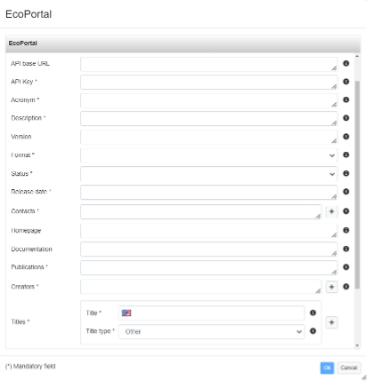
Figure 42: EcoPortal configuration wizard
The fields marked with an asterisk (*) are mandatory and all other fields are optional. Once the deployer has been configured, users can click on the “submit” button (Figure 42).
Note: We encourage creators, managers and editors of the semantic artefact in continuing the editing of their metadata directly from the EcoPortal edition page.